
Blocks
Logo SliderFree
On this page
The Logo Slider block for Gutenberg is a free tool that lets users create sleek, animated carousels to showcase logos perfect for displaying partners, clients, or brand affiliations with smooth transitions and customizable layouts.

Adding the block#
To add the block:
- Click the “+” button to add a new block.
- Search for “Logo Slider” and select it.
- For detailed instructions on how to add blocks in Gutenberg, please refer to the official WordPress Block Editor documentation (opens in a new tab).
Content configuration#
General settings#
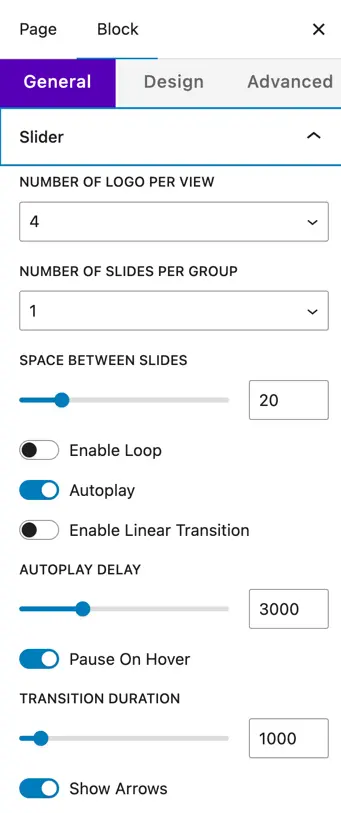
- Number of Logo per View – Set how many logos are visible at once in the slider.
- Number of Slides per Group – Choose how many logos move together in one slide transition.
- Space Between Slides – Define the gap between each logo item.
- Enable Loop – Make the slider loop continuously.
- Autoplay – Automatically play the slider.
- Enable Linear Transition – Enable smooth, linear sliding animation.
- Autoplay Delay – Time (in ms) between automatic slide transitions.
- Pause on Hover – Pause the slider when the mouse hovers over it.
- Transition Duration – Set the speed of the slide transition (in ms).
Navigation controls#
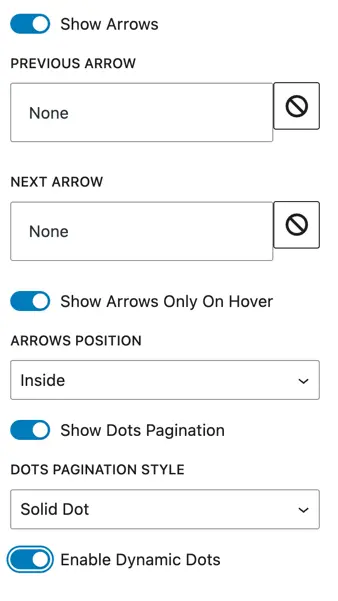
- Show Arrows – Display next and previous arrows.
- Show Arrows Only on Hover – Show arrows only when hovering over the slider.
- Arrows Position – Choose arrow placement (Inside or Outside).
- Show Dots Pagination – Display navigation dots below the slider.
- Dots Pagination Style – Choose style (Solid Dot) and enable dynamic dots.
Responsive settings#
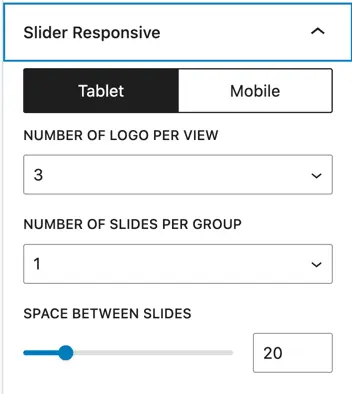
- Tablet / Mobile – Set the number of logos per view, slides per group, and space between slides separately for smaller devices.
Design Settings#
Logo Styling
- Logo Width & Height – Adjust the size of the logos in the slider.
Color Options
- Background Color – Set a background color for the slider container.
- Arrow Color & Background – Style the slider arrows.
- Active/Inactive Dot Pagination Color – Customize the color of navigation dots.
Spacing
- Padding – Add spacing around the slider content.
Was this article helpful?
Thanks for the feedback. Need more help? Contact support.