
Blocks
Image Hover EffectFree
The Image Hover Effect Block is a free block that transforms static images into interactive visuals with stylish hover animations. It’s a simple way to grab attention, add motion, and make your content more engaging all without custom CSS. Perfect for showcasing featured images.
Adding the block#
To add the block:
- Click the “+” button to add a new block.
- Search for “Image Hover Effect” and select it.
- For detailed instructions on how to add blocks in Gutenberg, please refer to the official WordPress Block Editor documentation (opens in a new tab).
General#
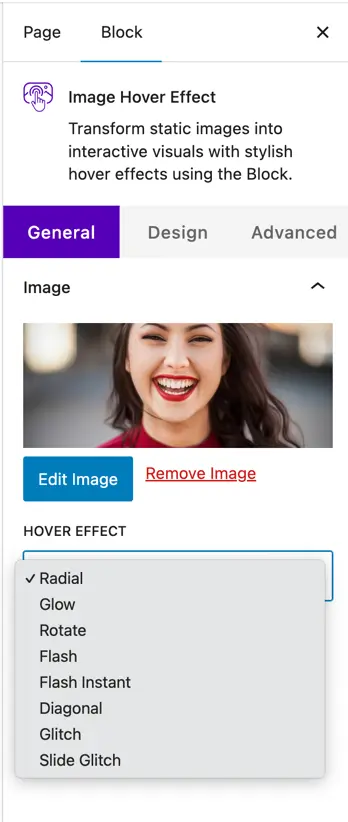
- Image – Upload, edit, or remove an image to apply hover effects.
- Hover Effect – Choose from multiple stylish hover animations:
- Radial
- Glow
- Rotate
- Flash
- Flash Instant
- Diagonal
- Glitch
- Slide Glitch
Design setting#
Image setting#
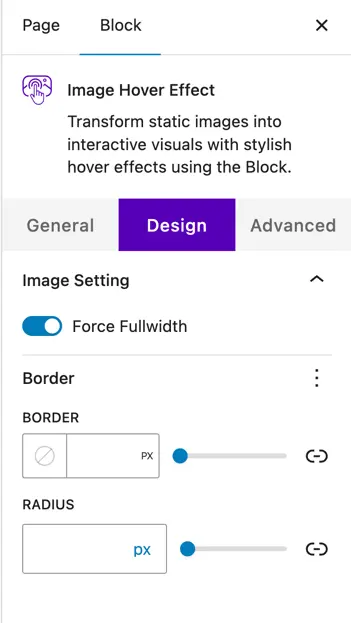
- Force Fullwidth – Expand the image to occupy the full available width.
Border#
- Border – Set the border thickness (in px).
- Radius – Adjust the corner roundness (in px).
Was this article helpful?
Thanks for the feedback. Need more help? Contact support.