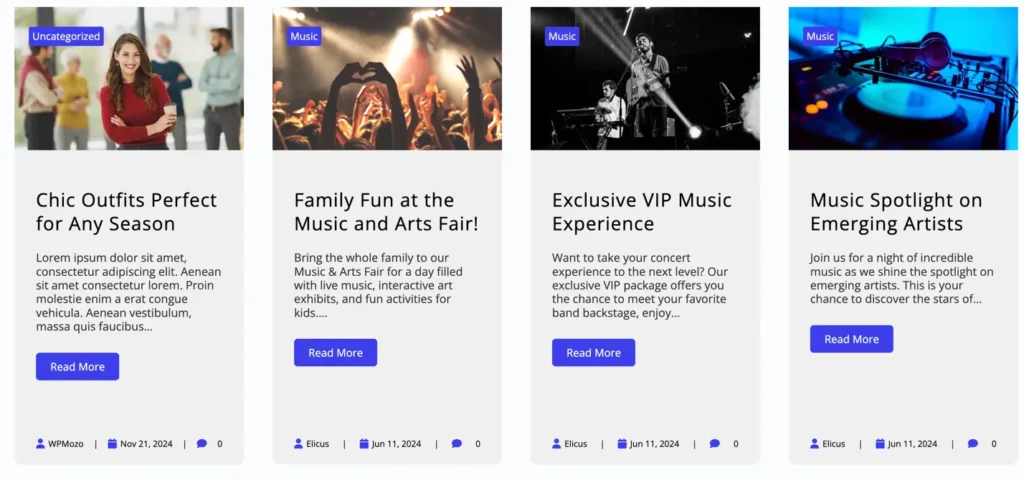
Horizontal Scrolling Posts
The Horizontal Scrolling Posts block allows you to display WordPress posts in a smooth horizontal scrolling layout. It is perfect for showcasing blog posts, news, or updates in a modern and space-saving design. This free block gives you full control over post layout, content visibility, and ordering options without any coding.
Adding the block
To add the block:
- Click the “+” button to add a new block.
- Search for “Horizontal Scrolling Posts” and select it.
Layout settings
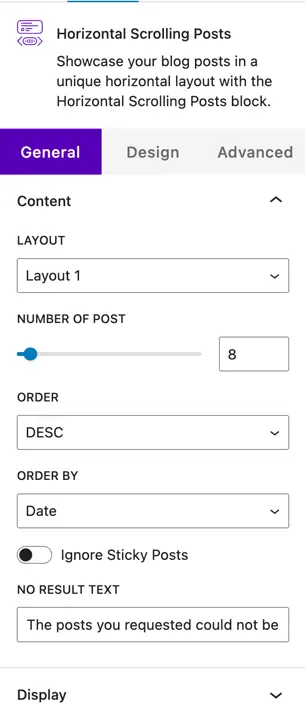
Layout options
This block provides 2 layout options.
You can choose the layout that best fits your website design and content style.
Number of posts
Use this option to define how many posts you want to display in the horizontal scrolling area.
Order
Select the order in which posts are displayed:
- Ascending
- Descending
Order by
Choose how posts should be sorted:
- Date
- Modified Date
- Slug
- ID
- Random
Ignore sticky posts
Enable this toggle option to exclude sticky posts from the post list.
No result text
Set a custom message to display when no posts are found.
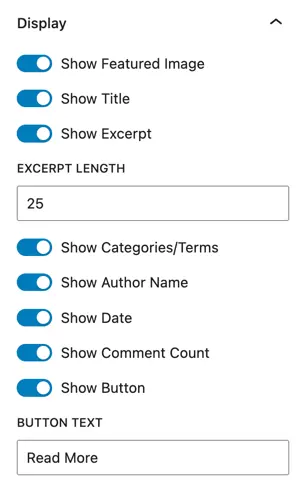
Display options
Show featured image
Enable this toggle to display the featured image of each post.
Show title
Turn this option on to display the post title.
Show excerpt
Enable this toggle to show the post excerpt.
Excerpt length
If the excerpt is enabled, you can control how many words are shown.
Show category / terms
Enable this option to display the post categories or terms.
Show author name
Turn on this toggle to show the author name of the post.
Show date
Enable this option to display the post publish date.
Show comment count
Turn this on to display the number of comments for each post.
Show button
Enable this toggle to display a call-to-action button on posts.
Button text
Use this option to set custom button text, such as Read More or View Post.