
Scrolling Zoom Gallery
Create engaging image galleries with the WPMozo Scrolling Zoom Gallery for Elementor. This widget lets you display images with a smooth zoom-on-scroll effect, making your gallery more interactive and visually appealing.
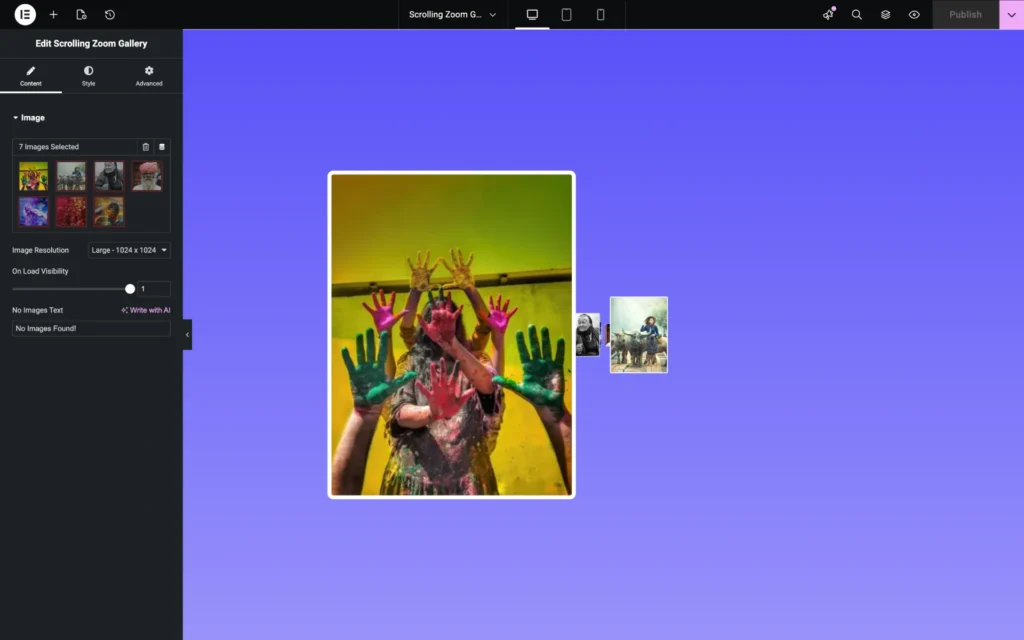
Content settings
Add images
Select one or multiple images from the Media Library to display them in the scrolling zoom gallery.
Image resolution
Choose the image size to control quality and performance. Higher resolutions provide better clarity, while smaller sizes help with faster loading.
On load visibility
Use the slider or input field to adjust the opacity of gallery images when the page loads. This setting controls whether images appear instantly or fade in smoothly as the user scrolls.
No images text
Enter custom text that will be shown when no images are added to the gallery.
Style settings
Image styling
Border type
Select the border style for gallery images, such as none, solid, dashed, or dotted.
Border width
Set the thickness of the image border.
Border color
Choose the color of the image border.
Border radius
Adjust the corner roundness of the images.
Box shadow
Apply a shadow effect to the images to add depth and enhance visual appearance.